Know exactly which GPU your model needs.
Size the VRAM, KV cache, and cloud instance for any open LLM in seconds. Then turn it into a report your client will actually read, with your name on it, not ours.
No signup to run it. Free account for exports. Teams work in a shared workspace. Sign in.
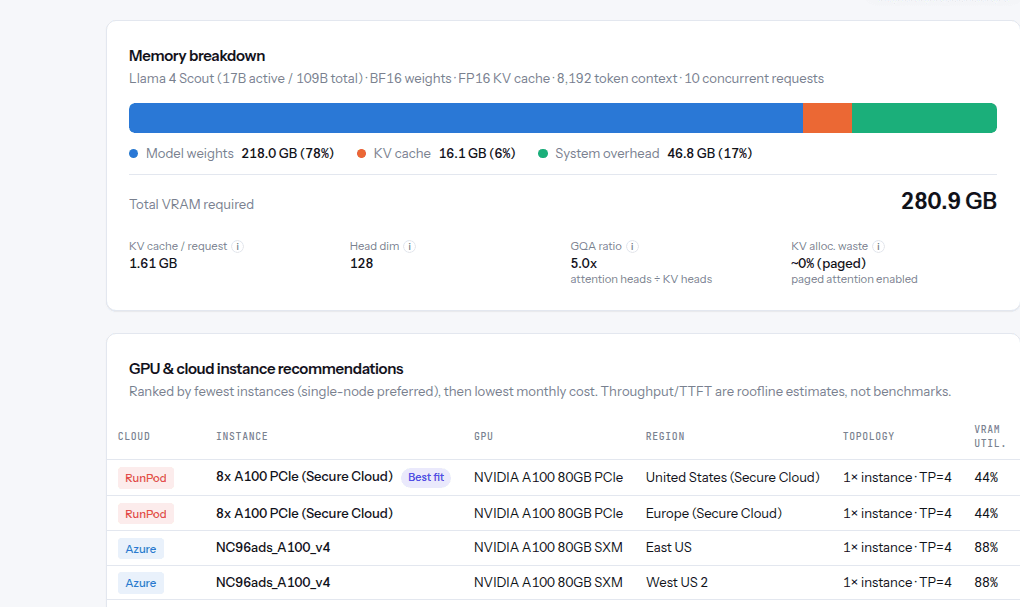
Live output from GPU Sizing Studio, sizing Llama 4 Scout in real time.
How it works
From a model name to a client-ready answer
Three steps, no spreadsheet. Built for the way consultants and platform teams actually size hardware.
Pick a model, get the memory
Choose from the catalog or paste a Hugging Face config. Weights and KV cache broken out for dense or mixture-of-experts models, from FP32 down to INT4.
Compare it across the clouds
Ranked GPU instances across hyperscalers and neoclouds, with multi-GPU topology, live pricing, and throughput and latency estimates for the traffic you expect.
Hand over a report
Export a branded PDF, or audit a running fleet and flag what's over- or under-provisioned.
Why teams switch
What this actually replaces
The real cost isn't the calculator work. It's what happens after a wrong guess ships.
Coverage
Sized against the clouds you'll actually deploy on
Real instance shapes, live pricing, and topology, not list prices from a spec page.
Stay in the loop
New models, providers, and pricing, straight to your inbox.
Pricing
Start free. Upgrade when it earns its keep.
The calculator is free for anyone. A free account adds exports and saved runs.
- Full calculator, no account
- Shareable result link
- Every model in the directory
- PDF and JSON export
- Saved run history
- Quantization comparison
- Team-sharing links
- Multi-client projects
- Branded client reports
- Multi-node sizing
- Live fleet & waste alerts
Early feedback
What early users are telling us
Real feedback from teams already using GPU Sizing Studio to plan deployments.
Cut our GPU sizing overhead by around 70%. What used to eat a whole afternoon in spreadsheets now takes minutes.
Everything we needed was under one roof: models, providers, pricing. No more juggling half a dozen docs and sheets.
Reliable, and a genuine time saver. It just works, every time we've reached for it.
FAQ
Frequently asked questions
Does this account for quantization?
Yes. Switch precision on any sizing run (FP32 down to INT4) and weights, KV cache, and instance fit all recalculate.
Do I need an account to use the calculator?
No. The full calculator runs with no signup. A free account just adds exports and saved run history.
Which providers are included?
AWS, Azure, and Google Cloud, plus GPU-focused neoclouds like RunPod, CoreWeave, and Lambda, all ranked side by side on every run.
Can I audit an already-running fleet, not just plan a new one?
Yes, on the Teams plan. Connect real usage data and GPU Sizing Studio flags instances that are over- or under-provisioned.
Ready to size your fleet?
No credit card, no signup. Enter a model and get a plan in under a minute.
Try the free calculator